New Evolve - Questions

Hi All,

Ive had some time to browse the features in the new Evolve. A few questions on how it will progress below. Of course, if Ive missed anything that would allow me to do what Ive asked in here, I’d love to know how!

- Articles seem to have been replaced with sections. Will I be able to save section styles like article styles eventually? Or even row, and column styles?

- Will hero images make a return? (The way they are on legacy, able to be switched on and text added using the editor, padding and margin, etc) Baking text into an image to get a header-style banner is not ideal.

- Will article dividers make a return? I use these a lot to add visual interest to pages! Obviously, now section dividers…

- Fixed page background images? So many nice effects can be achieved with these!

- The padding settings seem to have been simplified to S, M, L, etc. I can’t see any margin settings, which means there’s always a small margin to the vertical and horizontal of my sections. Will I be able to keep the old level of control if I want? Could there be an advanced setting with all of these able to be switched on perhaps?

- Are course extensions going to be added?

- Is there a reason tablet view has been removed from preview or will that be added in later?

Look forward to seeing how it progresses!
4 Likes

Great Questions, Craig, and I’m gladf you’re digging into New Evolve and sharing your feedback!

I’m going to ask our Product Manager and dev team if they can give you any definitve answers on these. Also your questions help us see what people want out of the tool and help us decide what to make a priority, so thank you again.

Question on theming, Ive added some elements in that look fine on desktop/laptop but when I switch to mobile preview, size of text, weight of text, padding between heading and sub heading text doesnt really work visually. I cant see a way in the edit theme window to adjust for mobile and tablet devices to fix this, am I missing a switch or option somewhere to change this or is it not available?

Hi @craigsteveid like I said in the other thread, device specific settings will be coming in the future, but can’t say exactly when yet.

Cheers-Sam

1 Like

Hi,

The title of this topic is quite unspecific, but it actually fits my questions quite well.

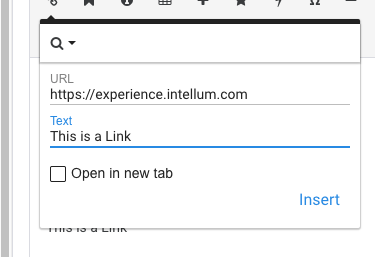
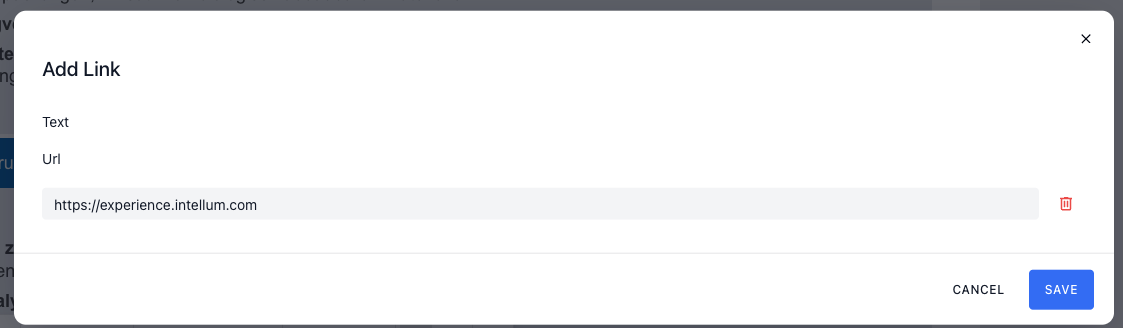
  1. Is there a way to change the text of a link? In Legacy, I was able to insert a link into my learning content and change the link text. But in the new Evolve, I can only see the “Text” field — and I can’t change anything there.

  2. I remember that we were able to increase the size limit for uploaded files in Assets (via a PM to you, Sam). Is this still possible, and if so, what’s the current limit?

  3. Will there be a way to add global feedback in the (near) future? There aren’t many options in the course settings compared to Legacy Evolve, and one thing I’m missing is the global feedback feature.

Best regards,
Lars

Regarding point 1, if you’re trying to add a link using the text editor, the assumption is that you’ve selected the text you wanted to add a link to - I don’t think we’d considered that someone might use ‘Insert Link’ to add both text and link when nothing is selected… Can look into that for you!

FYI you can also paste a link the same way you can do here i.e. select the text then add the link from your clipboard using CTRL/CMD + V

I hadn’t thought of it that way.
I only asked because Legacy allowed you to change the link text afterwards as well (see attached file). But it’s not high priority; I just noticed that.

Lars

Apologies for adding more to this thread, but the general title fits my general, broad questions.

Long-time Evolve user, and trialling out the New Evolve for my organisation, and trying to build a business case for why we should use the new one now versus Legacy.

My questions are;

  1. Does any form of content locking exist right now, and if no, how soon are you looking at bringing it in.
  2. Can you give us a timeline for when we might see extensions again, from branding to course assessment, resources, bookmarking, content locking etc?
  3. Will the different menu options come back, in particular the box menu?
  4. When will we see additional components like branching, sliders, text input fields, audio, course assessment results, radio group/checkbox group or any of the components that stored to a variable etc?
  5. If a Legacy subscription is purchased now, can it be converted to a new Evolve subscription down the line when the new Evolve is ready to build the type of courses we need to create for our clients/learners?
  6. Replacing assets in the asset bank - this was such a ridiculously handy feature in Evolve Legacy.

Franzi

2 Likes

@FranziJH just to quickly answer the point about audio - the ‘media’ element in new Evolve can handle audio/mp3 as well as video/mp4

2 Likes

Hi Franzi! Thanks so much for the thoughtful questions. It’s nice to see you here :slight_smile:

We’re hearing similar questions from many long-time Evolve users who are exploring the new version, so I’m glad you raised them here. I’ll share what I can at a high level:

Content locking:
Content locking isn’t available yet in New Evolve, but we’re rebuilding this functionality (via Logic) currently and expect to have this available sometime in December.

Extensions (branding, resources, assessment, bookmarking, etc.):
Extensions will be returning over time. Some have already been rebuilt in the new architecture as course settings, and others will roll out incrementally as the feature set expands.

Menu types (including box menu):
We know many teams rely on alternative menu designs, and menu flexibility is something the team intends to support in future releases. We’ll share more via our official comms (monthly email updates, in-app messaging, and posts within this Community) as work progresses.

Additional components (branching, text inputs, sliders, assessment elements, variable-based components):
These fall into a broader category of advanced interactive functionality. The team is actively building foundational capabilities (such as logic and variables) that enable many of these components. As those foundations are completed, you’ll see more complex components appear.

Asset replacement in the asset bank:
This is a known workflow that many Legacy users found valuable. Improvements to asset management are planned, and we’ll update the Community as those enhancements are released.

Can we purchase Legacy now and move to New Evolve later?
Yes – customers can continue using Legacy today if the current New Evolve feature set doesn’t meet their needs; you can simply reach out to Customer Care to provision a legacy account. As New Evolve expands, customers will be able to move over when it supports their required workflows. We’re currently gathering customer feedback (including questions like yours) to shape how that transition should work, and we’ll share more details once they’re finalized.

New Evolve is still in an early stage, with capabilities being released iteratively. Some of the more advanced features from Legacy haven’t been rebuilt yet, but the foundations for them are actively underway. Your questions are exactly the types of inputs we use to prioritize what comes next, so thank you for surfacing them.

If you’re open to it, feel free to continue sharing what’s most important for your team’s workflows – it’s incredibly helpful as we continue developing the platform.

Best,

Emily

4 Likes